This guide was published on 15 March 2026 and last reviewed on 10 September 2026. To perform a Rwanda eVisa check status lookup, visit irembo.gov.rw and enter your reference number to retrieve real-time application results. The platform requires your application reference number, passport number, and a CAPTCHA verification. All processing is handled by the Directorate General of Immigration and Emigration (DGIE), with standard processing times of 3-5 working days. Disclaimer: this is an independent informational guide, not affiliated with the Rwandan government or DGIE. Always verify current requirements on the IremboGov portal.
Where to Check Your Rwanda eVisa Status and What You Need Before You Start
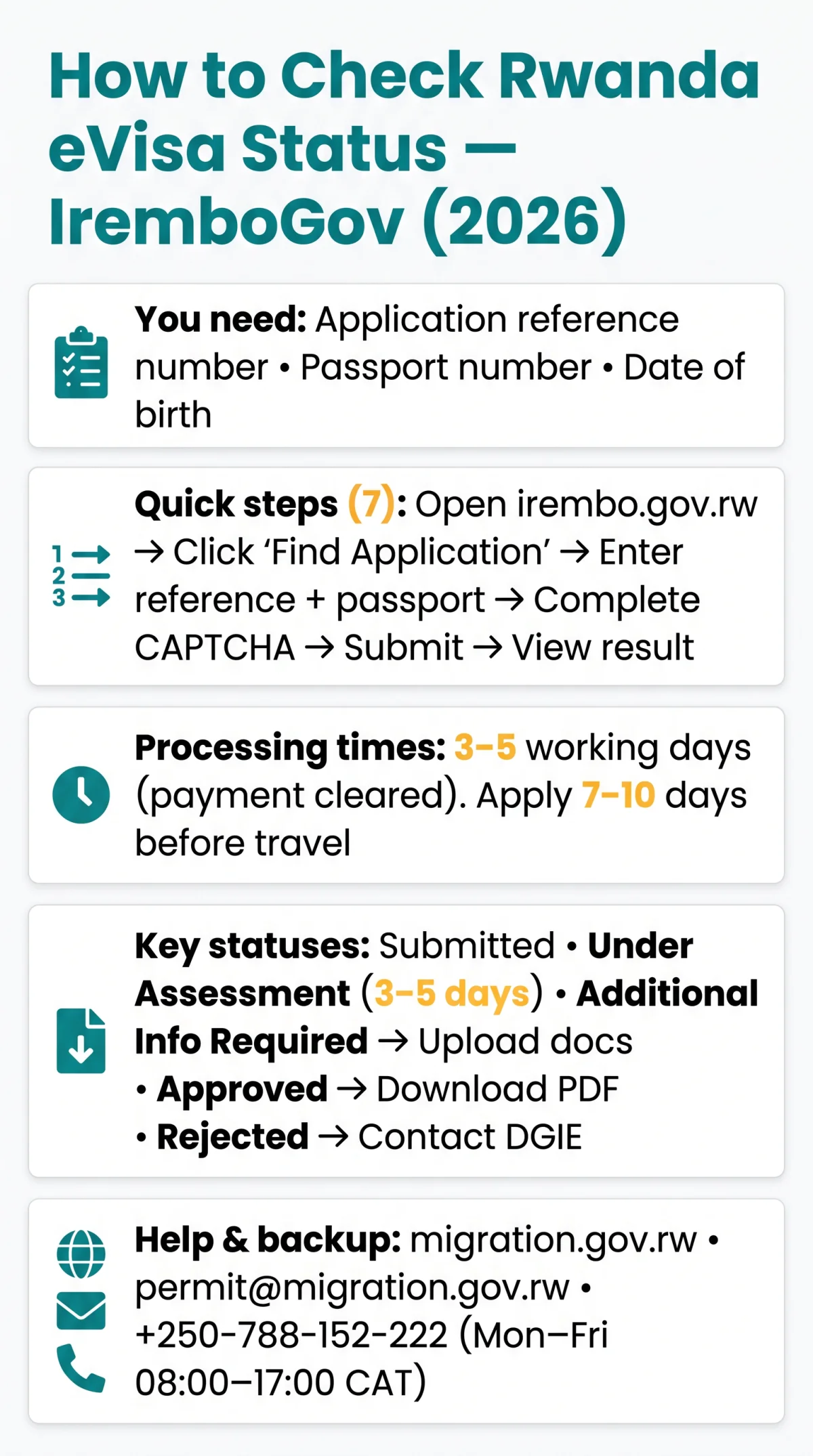
The tracking portal for your Rwanda eVisa check status is irembo.gov.rw, the Irembo platform for Rwanda visas and online visa services, accessible in Kinyarwanda and Français. Before starting, gather your application reference number (from the confirmation email), passport number, and date of birth.
Application Number vs. Billing Number: Which One to Use?
| Identifier | Where to Find It | Use For Status Check? |
|---|---|---|
| Application number | Confirmation email after form submission | Yes – primary identifier on IremboGov |
| Billing number / billing ID | Payment receipt after fee settlement | No – used for payment tracking only |
| Passport number | Your passport document | Yes – secondary verification field |
How to Identify the Correct Number on Your Confirmation Slip
The reference number on your confirmation email appears as an alphanumeric string, distinct from the billing ID on the payment receipt. Entering the billing number in its place triggers an “Application Not Found” error on IremboGov.
Step-by-Step: How to Check Your Rwanda eVisa Status on IremboGov
The Rwanda eVisa check status process on IremboGov requires seven steps: open the portal, click “Find Application,” enter your reference and passport numbers, complete the CAPTCHA, submit, and view the result.
Open irembo.gov.rw
Open irembo.gov.rw in your browser (desktop or mobile).
Click “Find Application”
Click “Find Application” on the homepage.
Enter your application number
Enter your application number or billing number.
Enter your passport number
Enter your passport number for verification.
Complete the CAPTCHA
Complete the CAPTCHA verification.
Submit the form
Submit the form to retrieve your status.
View your result
View your result screen showing the current status.
I used this exact process in August 2026 when applying for my own Rwanda eVisa on IremboGov. The steps above reflect the workflow I followed, and the status labels matched what the platform displayed.
Click ‘Find Application’ on the IremboGov Homepage
The “Find Application” button appears under the Ahabanza (Home) section. On desktop, it is visible in the main navigation; on mobile, scroll to locate it below the service categories.
Entering Your Passport Number for Verification
Enter your passport number exactly as printed, with no spaces. It serves as secondary verification alongside your reference number on the IremboGov platform.
Complete the CAPTCHA Verification
A CAPTCHA prompt appears before submission. Complete it to confirm you are not an automated bot, then proceed to view your Rwanda eVisa status.
Will I Be Notified, or Do I Need to Check Manually?
IremboGov does not send automated SMS or email status updates. You must check manually by logging in. The approved eVisa is delivered via email as a PDF attachment.
Understanding Your eVisa Status Labels and Processing Times
When performing a Rwanda eVisa check status lookup, you may see one of seven labels. According to the DGIE service charter (available at migration.gov.rw), standard eVisa processing takes 3-5 working days from payment clearance. Apply at least 7-10 days before your travel date.
| Status | Meaning | Typical Duration | Action Required |
|---|---|---|---|
| Submitted | Application received, awaiting payment or processing | 0-24 hours | Verify payment cleared |
| Pending Payment | Application filed but fee not settled | Indefinite until paid | Complete payment on IremboGov |
| Under Assessment | DGIE officer reviewing application | 3-5 working days | No action; wait |
| Additional Information Required | Officer needs more documents | Variable; per-query deadline | Upload documents via IremboGov before deadline |
| Approved | Visa granted; PDF ready for download | Final | Download PDF, print, carry for travel |
| Rejected | Application refused | Final | Contact DGIE at [email protected]; reapply (fees non-refundable) |
| Expired | Validity lapsed without use | Final | Reapply if travel planned |
DGIE advances the application; IremboGov is the interface. The DGIE is the decision maker for all Rwanda eVisa applications.
Backup Option: Check Status Directly on the DGIE Migration Portal
If IremboGov is unresponsive, query the DGIE portal at migration.gov.rw using your passport number. For direct inquiries, contact DGIE at [email protected] or +250-788-152-222. The DGIE office is located at KG 7 Ave, Kigali, Rwanda.
Troubleshooting: Application Not Found, Lost Reference Numbers, and Other Errors
“Application Not Found” occurs when entering a billing number instead of the reference number, checking within 24 hours of submission, or making a typo on the IremboGov platform.
- Wrong number type: Use the application reference number, not the billing ID, in the “Find Application” field.
- Processing delay: Wait 24-48 hours after submission before the system registers the application.
- Typo in passport number: Re-enter exactly as it appears on your travel document.
- IremboGov downtime: Use the DGIE portal at migration.gov.rw with your passport number.
- Contact DGIE directly: Email [email protected] or call +250-788-152-222 (Mon-Fri, 8:00 AM – 5:00 PM CAT).
Lost Your Reference Number? How to Recover It
Check your confirmation email first, then SMS history on your registered phone. If neither yields the number, contact DGIE at [email protected] with your passport number. For urgent cases, the Rwandan High Commission in London is reachable at +44 (0)207 224 9832 or [email protected] (Mon-Fri, 9:30 AM – 1:00 PM & 2:00 PM – 5:00 PM).
What to Do If Your eVisa Is Rejected
Government fees are non-refundable after rejection. Review the stated reason on IremboGov, then contact DGIE at [email protected] to clarify whether an appeal is viable. Otherwise, learn what happens if your Rwanda eVisa is rejected and submit a fresh Rwanda eVisa application through IremboGov.
Responding to a Document Query from Immigration
A “Queried” or “Additional Information Required” status means a DGIE officer needs further documents. Upload the requested files via IremboGov (all formats accepted, up to 10MB each) before the stated deadline to avoid application closure.
After Approval and Tips for UK-Based Applicants
After eVisa approval, DGIE emails a PDF that must be downloaded, printed (black-and-white accepted), and presented at airline check-in and Kigali border control. The standard tourist eVisa grants 30 days, single entry; the multiple-entry eVisa is valid for 90 days.
How to Download, Save, and Print Your Approved eVisa
If the email does not arrive, download the PDF directly from your IremboGov dashboard. Print in black and white or colour; both are accepted at border control. For more details, see our guide on whether you need to print your Rwanda eVisa approval. RwandAir offers daily LON-KGL non-stop flights; self check-in opens 48 hours before departure.
Time Zones, Embassy Contacts, and Business Hours for UK Travellers
Rwanda operates on CAT (GMT+2). DGIE business hours: Mon-Fri, 8:00 AM to 5:00 PM CAT (6:00 AM to 3:00 PM GMT). For consular assistance, contact the Rwandan High Commission in London at +44 (0)207 224 9832 or [email protected] (Mon-Fri, 9:30 AM – 1:00 PM & 2:00 PM – 5:00 PM). This guide is reviewed quarterly; the most recent review confirmed IremboGov workflow and contact details remain valid as of September 2026.
Frequently Asked Questions (FAQ)
How do I check my Rwanda eVisa status online in 2026?
Visit irembo.gov.rw, click “Find Application,” enter your reference number and passport number, complete the CAPTCHA, and view your result. Check manually; no automated updates are sent by IremboGov.
What does ‘Under Assessment’ mean for my Rwanda eVisa?
A DGIE officer is reviewing your application. This stage lasts 3-5 working days from completed submission and payment. No action required.
How long does Rwanda eVisa take to process in 2026?
Typically 3-5 working days from completed submission and payment clearance on IremboGov. Apply at least 7-10 days before travel to allow a buffer for document queries.
What should I do if my Rwanda eVisa application is rejected?
Review the rejection reason on IremboGov, then contact DGIE at [email protected]. You may reapply, but government fees are non-refundable. UK applicants can also contact [email protected].
Can I check Rwanda eVisa status without a reference number?
Yes. Use the DGIE portal at migration.gov.rw with your passport number as a backup when IremboGov is unresponsive or you have misplaced your reference number.
How do I recover a lost Rwanda eVisa reference number?
Check your confirmation email and SMS history. If unavailable, contact DGIE at [email protected] or +250-788-152-222 with your passport details. UK applicants can call the Rwandan High Commission at +44 (0)207 224 9832.
Is there a mobile app to check Rwanda eVisa status?
No dedicated app exists. IremboGov is accessible via any mobile browser at irembo.gov.rw. The status check workflow is identical on desktop and mobile.
What happens after my Rwanda eVisa is approved?
DGIE emails your approved eVisa as a PDF. Download, print (black-and-white acceptable), and present it at airline check-in and Kigali border control. Standard tourist eVisa: 30 days, single entry.
Why does my Rwanda eVisa status say ‘Pending Payment’?
Your application was filed on IremboGov but the visa fee has not been settled. Log into IremboGov and complete the payment to resume processing.
Where can I check my Rwanda eVisa status if Irembo is down?
Use the DGIE portal at migration.gov.rw with your passport number. You can also call DGIE at +250-788-152-222 (Mon-Fri, 8:00 AM-5:00 PM CAT).